Accelerate Your Data Science Workflows with NVIDIA's RAPIDS Library

If you are a data scientist who works with large and complex datasets, you may have encountered some challenges with the performance and scalability of your tools and frameworks. Many of the popular data science libraries, such as pandas, scikit-learn, and networkX, are designed for CPU-based systems, which can limit their ability to handle massive amounts of data and computation.
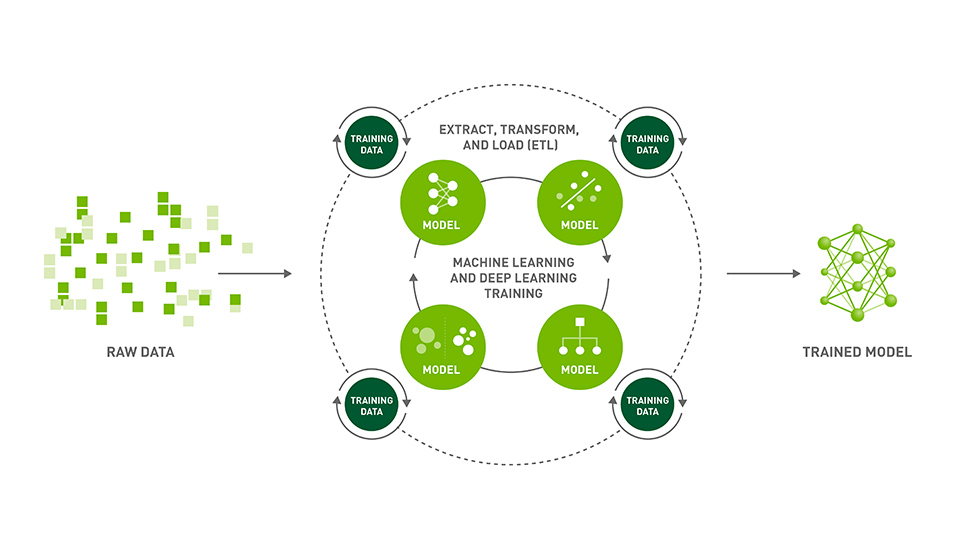
Fortunately, there is a solution that can help you overcome these challenges and speed up your data science workflows: NVIDIA’s RAPIDS library. RAPIDS is a suite of open-source software libraries that enable you to execute end-to-end data science and analytics pipelines entirely on GPUs. RAPIDS leverages the power of NVIDIA CUDA primitives for low-level compute optimization but exposes GPU parallelism and high-bandwidth memory speed through user-friendly Python interfaces that match the most popular PyData libraries
In this blog post, I will show you some of the features and benefits of RAPIDS, how it compares to traditional CPU-based libraries, and what are the current limitations and future directions of this project.
What can you do with RAPIDS?
RAPIDS consists of several components, each providing a GPU-accelerated version of a common data science library. The main components are:
- cuDF: a GPU DataFrame library that provides a pandas-like API for loading, filtering, and manipulating data. For example, you can use cuDF to read a CSV file into a GPU DataFrame and perform some basic operations:

import cudf

# Read CSV file into GPU DataFrame
gdf = cudf.read_csv("data.csv")

# Print the first 5 rows
print(gdf.head())

# Filter rows by a condition
gdf_filtered = gdf[gdf["age"] > 30]

# Group by a column and compute the mean
gdf_grouped = gdf_filtered.groupby("gender").mean()
cuML: a GPU machine learning library that provides a scikit-learn-like API for training and deploying models. For example, you can use cuML to train a
K-Means clustering model on a GPU DataFrame and predict cluster labels:
import cudf
import cuml

# Read CSV file into GPU DataFrame
gdf = cudf.read_csv("data.csv")

# Train K-means model on GPU DataFrame
kmeans = cuml.KMeans(n_clusters=3)
kmeans.fit(gdf)

# Predict cluster labels on GPU DataFrame
labels = kmeans.predict(gdf)
- cuGraph: a GPU graph analytics library that provides a networkX-like API for analyzing and visualizing graphs. For example, you can use cuGraph to create a graph from a GPU DataFrame and compute some graph metrics:
import cudf
import cugraph

# Read edge list file into GPU DataFrame
gdf = cudf.read_csv("edges.csv", names=["src", "dst"])

# Create graph from GPU DataFrame
G = cugraph.Graph()
G.from_cudf_edgelist(gdf)

# Compute degree centrality for each node
dc = cugraph.degree_centrality(G)

# Compute PageRank for each node
pr = cugraph.pagerank(G)
cuSpatial: a GPU spatial data analysis library that provides geospatial operations such as point-in-polygon tests, distance calculations, and spatial joins.
cuSignal: a GPU signal processing library that provides scipy.signal-like API for processing time-series data such as audio, video, and sensor signals.
cuXfilter: a GPU cross-filtering library that provides interactive dashboards for exploring and filtering datasets.
RAPIDS also integrates with other popular tools and frameworks for data science, such as Dask, Spark, BlazingSQL, XGBoost, TensorFlow, PyTorch, and more. This allows you to leverage the existing ecosystem of Python packages and libraries while benefiting from the speed and scalability of GPUs.
How does RAPIDS compare to traditional libraries?
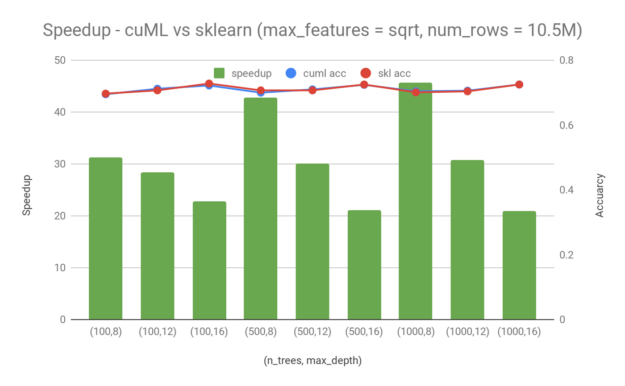
One of the main advantages of RAPIDS is that it can significantly reduce the execution time of data science workflows by utilizing the parallelism and memory bandwidth of GPUs. For example, according to NVIDIA benchmarks, cuDF can perform DataFrame operations up to 50 times faster than pandas, cuML can train machine learning models up to 170 times faster than scikit-learn, and cuGraph can analyze graphs up to 1000 times faster than networkX.
Another benefit of RAPIDS is that it can simplify the data science pipeline by avoiding unnecessary data movement between CPU and GPU. By keeping the data on the GPU throughout the entire workflow, RAPIDS can eliminate the overhead of copying data back and forth between different devices and formats. This also enables seamless integration with other GPU-based libraries and frameworks, such as XGBoost for gradient boosting or TensorFlow for deep learning.
Furthermore, RAPIDS can scale up to handle large and complex datasets that may not fit in the memory of a single GPU or CPU. By using distributed computing frameworks such as Dask or Spark, RAPIDS can leverage multiple GPUs across multiple nodes to process terabytes or even petabytes of data in parallel. This allows you to tackle real-world problems that require massive amounts of data and computation.
What are the challenges and opportunities of RAPIDS?
Despite its many advantages, RAPIDS is not a perfect solution for all data science problems. There are some challenges and opportunities that you should be aware of before adopting RAPIDS.
One challenge is that RAPIDS requires specific hardware and software requirements to run properly. You need to have NVIDIA Pascal or better GPUs with a compute capability 6.0 or above, as well as compatible CUDA versions and NVIDIA drivers. You also need to install RAPIDS using conda or pip channels or Docker containers. These requirements may pose some difficulties for you if you do not have access to suitable GPUs or if you prefer other installation methods.
Another challenge is that RAPIDS does not support all the features and functionalities of the original CPU-based libraries. For example, cuDF does not implement all the pandas methods and attributes, cuML does not support all the scikit-learn estimators and metrics, and cuGraph does not support all the networkX algorithms and functions. You may need to check the documentation and compatibility tables of each library before using them.
One opportunity is that RAPIDS is an open-source project that welcomes contributions from the community. You can help improve RAPIDS by reporting issues, suggesting features, writing documentation, or submitting code patches on GitHub. You can also join the RAPIDS community forums or Slack channels to ask questions, share feedback, or learn from other users.
Another opportunity is that RAPIDS is constantly evolving and adding new features and functionalities. For example, some of the recent additions include cuSpatial for spatial data analysis, cuSignal for signal processing, cuXfilter for cross-filtering, and BlazingSQL for SQL queries on GPU DataFrames. You can stay updated with the latest developments by following the RAPIDS blog or Twitter account.
Conclusion
RAPIDS is a suite of software libraries that enable you to accelerate your data science workflows using GPUs. RAPIDS provides user-friendly Python interfaces that match the most popular PyData libraries, such as pandas, scikit-learn, and networkX. RAPIDS can significantly reduce the execution time of data science workflows, simplify the data science pipeline, and scale up to handle large and complex datasets. RAPIDS also integrates with other popular tools and frameworks for data science, such as Dask, Spark, XGBoost, TensorFlow, PyTorch, and more.
RAPIDS is not without its limitations and challenges, such as hardware and software requirements, feature gaps, and compatibility issues. However, RAPIDS is also an open-source project that welcomes contributions from the community and is constantly evolving and adding new features and functionalities. If you are interested in trying out RAPIDS, you can find more information on the official website or check out some of the example notebooks on GitHub.
I hope this blog post has given you an overview of what RAPIDS is, how it works, and why you should use it for your data science projects. To know more visit Rapids & get started. If you have any questions or feedback, please feel free to leave a comment below or contact NVIDIA at rapids@nvidia.com.